
If you have ChatGPT Pro and want to create an image, first check whether you are in regular Chat or Codex/Work. They draw on different allowances even under the same subscription. ChatGPT pricing describes image creation in regular Pro chats as “unlimited.” Images created in Codex, however, use the Codex/Work allowance shared with coding and other work. Claude is different again: the Claude model itself does not generate photographs or illustrations. Claude Code can still draw diagrams through code or call an external image-generation tool.
What this article covers
- “Unlimited” image creation on ChatGPT Pro refers to regular Chat
- Images in Codex consume tokens and its work allowance
- ChatGPT and Codex images from the same request
- Can Claude and Claude Code create images?
- Making images you can actually use: from brief to selection
- Which tool fits which task?
- Frequently asked questions
“Unlimited” image creation on ChatGPT Pro refers to regular Chat
OpenAI’s ChatGPT pricing page describes Pro as offering “Unlimited and faster image creation.” “Unlimited” here is the wording of the pricing page, rather than a published fixed daily image cap. The same page notes that it is subject to abuse-prevention limits. Do not read it as a guarantee that you can generate hundreds of images continuously every day.
In a regular ChatGPT chat, you can ask for an image during the conversation or start from the image-creation screen. OpenAI’s Images in ChatGPT guide also explains how to upload an existing image and request a change. If all you need is an image, this is the most straightforward place to start. If you will use it in another production tool, save the generated image at its original resolution.
A common source of confusion is Chat versus Work in ChatGPT. The screen may be in ChatGPT, but Work shares its allowance with Codex. The “unlimited” Pro image-creation wording cannot simply be applied to Work tasks or Codex. OpenAI’s Work/Codex pricing documentation explicitly says the two share usage limits and credits.
Images in Codex consume tokens and its work allowance
Codex can generate and edit images, but it does not use the image limit shown for a regular ChatGPT chat. OpenAI’s Codex help page explains that image-generation limits and reset times displayed in ChatGPT do not apply to Codex. In Codex, image input and output are processed as tokens. With a subscription login, usage first counts against the plan’s general allowance.
OpenAI’s average guideline: compared with a similar turn without an image, image generation uses the allowance about 3–5 times faster. Quality and size change usage, so there is no fixed “one image = X messages” conversion.
Token usage is not the same thing as an extra charge. For a Pro user signed in with a ChatGPT account, creating an image does not mean a separate API bill each time. It first uses the allowance included in the subscription. Once that runs out, available extra credits may be used; without them, you wait for the allowance to refresh. Using Codex with an API key instead incurs API pricing, so you cannot say “Pro means no additional cost” without checking how you signed in. The Codex usage screen shows your available allowance and reset time.
For example, asking Codex to create an image for a website, inspect it, and then update the site code can keep the work in one place. If you are only iterating through image candidates, you could instead generate them in regular Chat, save the original-resolution files, and hand only the chosen one to Codex. The latter is not necessarily faster or cheaper, but you can choose deliberately which allowance each part of the work uses.
Before starting, check the current mode and authentication method, not just the name at the top of the screen. Is the ChatGPT conversation regular Chat or Work? Is Codex signed in through your ChatGPT account or an API key? Mixing up those two distinctions changes the explanation of remaining usage and charges, even if both experiences feel like “making an image with Pro.” Record the date, entry point, plan and image-quality setting in your production notes so you can trace the result later.
ChatGPT and Codex images from the same request
Let’s look at two examples. On September 30, 2026, this site entered the same English prompt once in each product. The ChatGPT image was created in regular Chat on a Pro account; the Codex image used its built-in image-generation feature. We attached no reference image, made no edits afterward, and did not select from multiple candidates.
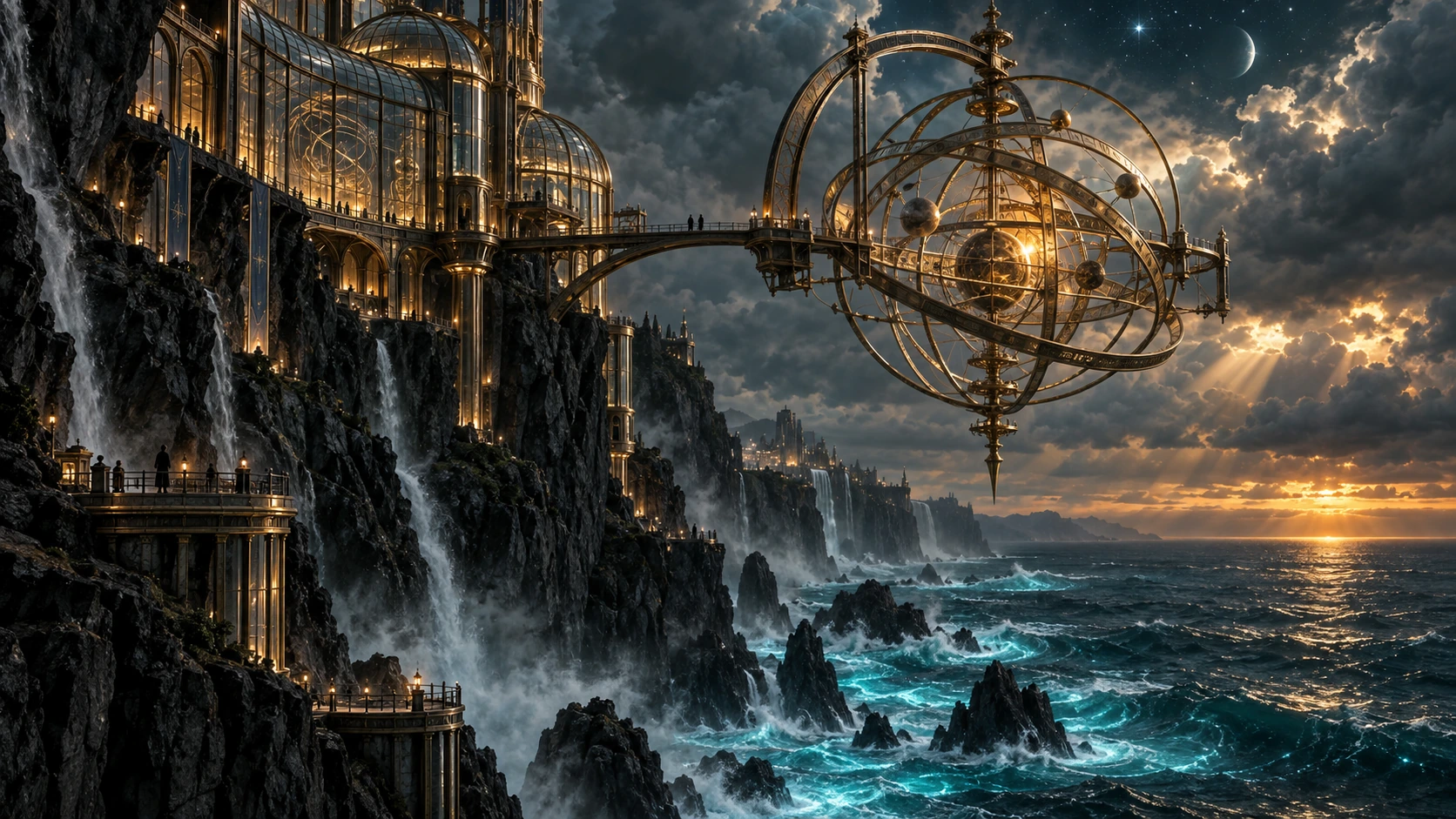
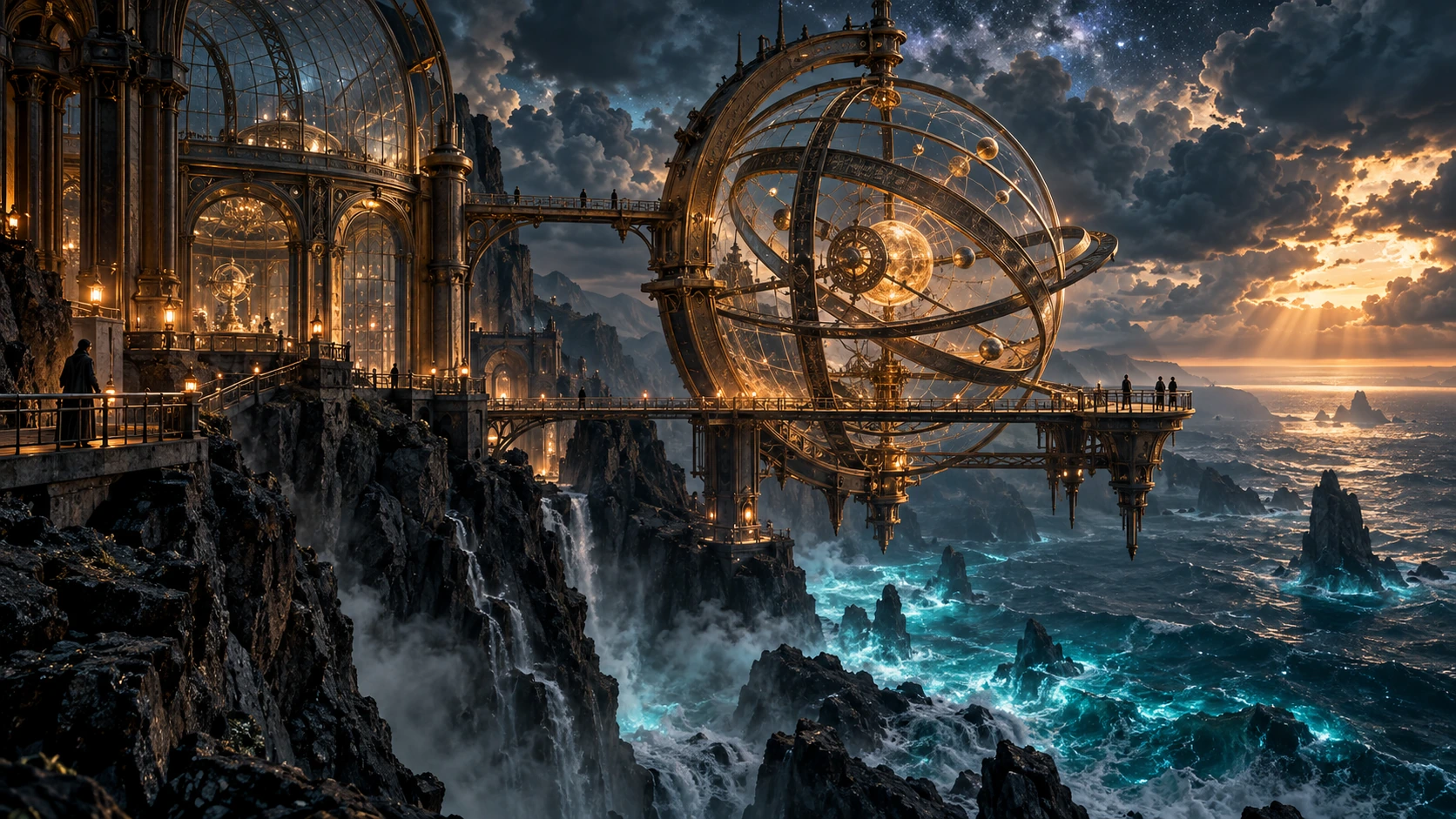
The public documentation tells us one possible internal arrangement: in OpenAI’s Responses API, a conversational model can call an image-generation tool, which then creates an image with a GPT Image model. The conversational model may rewrite the image prompt, and the API can expose that revised prompt. But the public information and these interfaces do not establish whether regular ChatGPT and Codex used the same image model or the same internal prompt here. Similar-looking results alone do not reveal their internal path.
Read the full shared prompt
We requested one wide concept-art image: an observatory and giant armillary sphere on a cliff above the sea, teal and amber lighting, tiny people to convey the scale, and no text or logos.
Use case: stylized-concept. Asset type: editorial sample image for a Japanese article demonstrating AI image generation. Create ONE standalone horizontal 16:9 image, without any typography. Scene: a vast glass-and-brass observatory built into a sheer black volcanic cliff above a storm-lit ocean at twilight. An immense intricate armillary sphere hangs over the sea, its concentric rings catching warm amber light; narrow bridges and a few tiny human silhouettes reveal the colossal scale. Below, turquoise bioluminescent waves strike the rock; above, layered storm clouds break into shafts of light and faint stars. Style: exceptionally polished cinematic concept art with believable architectural detail, atmospheric depth, coherent perspective, restrained deep teal and amber palette, tactile materials, sharp focal point and rich detail that survives reduction to an article card. Composition: one wide coherent scene, focal sphere slightly right of center, clean readable silhouettes. No words, letters, signage, logos, borders, collage, or watermark.
Can an image file reveal that AI made it?
OpenAI says supported images generated in ChatGPT and Codex can carry C2PA provenance metadata and an invisible SynthID watermark. Whether those signals are present depends on the product, model, save method and creation date. C2PA is information attached to the file and can be lost during conversion or resaving. SynthID is a separate signal embedded in the image content. OpenAI’s content-provenance guide also cautions that failing to detect either signal does not prove an image is not AI-generated.
caBX.caBX is the area specified by C2PA for storing a PNG manifest. The presence of that area does not itself prove the signature is valid, and we have not verified signature authenticity here.For anyone who wants to investigate, we have also provided the pre-conversion original ChatGPT PNG and original Codex PNG. OpenAI’s verification tool can check C2PA and SynthID signals in supported files, but using it sends the image to that service. Detecting a signal would identify supported provenance information; it would not prove the submitted prompt, the user, or whether the image came from regular Chat or Codex. Our labels for the generation routes are based on this site’s work records.
Can Claude and Claude Code create images?
If “create images” means directly generating photographs or illustrations with an image model, current Claude models do not offer that capability. Anthropic’s official help page says Claude does not create photos or illustrations the way an image-generation tool does. Its API vision documentation likewise distinguishes understanding and analyzing images from generating or editing them.
Diagrams and comparison tables let you position text and shapes precisely. A PNG drawn through code, however, does not mean the Claude model generated a photograph. Route 03 for photos and illustrations could involve Claude Code calling OpenAI’s GPT Image API or Google’s Gemini image API. Claude Code can organize the instructions and save the file, while the connected provider generates the image itself. The user must set up the external API or MCP tool and supply credentials for the image API. Claude Code does not automatically gain access to either provider’s image API out of the box.
If you compare the same image API, model and resolution, routing the request through Claude Code does not remove the image-API charge; the Claude-side processing also uses an allowance or API tokens. Total usage can therefore rise compared with calling the image API directly. With a Claude Pro or Max subscription, though, the Claude-side work may fit within the included allowance rather than create a separate bill. Claude Code’s cost documentation distinguishes subscription usage from API billing. OpenAI’s image-API documentation accounts for image generation separately from the conversational model. As a concrete example, Google’s Gemini API pricing page listed 1K image output with Gemini 3.1 Flash Image in the paid Standard tier at an equivalent $0.067 per image on September 30, 2026, excluding input and other charges. You would still pay that image-API charge when calling it through Claude Code, while also using Claude-side capacity.
By contrast, Codex’s built-in generation when signed in with a ChatGPT account and direct generation in the Gemini app operate under their respective product allowances. You cannot compare an API’s metered per-image charge with those allowances and conclude that “Claude always costs X more per image.” Codex image generation uses the shared Work/Codex allowance, whereas API-key authentication incurs API pricing. If you already have an included allowance and only need image concepts, generating directly in that product may spare you the external-API setup and management of two allowances. Claude Code is useful when you want image generation, integration into code and inspection to run as one workflow.
Making images you can actually use: from brief to selection
The following field notes come from a separate production project in which the site operator generated and reviewed images. We have turned the lessons into a reusable workflow. The records do not include the model version or date of that work, so they are not a performance test of a particular model or evidence of reproducibility. Their value is in the sequence of work and the failures actually observed, not in the subject matter or a ranking of the final images.
1. Decide the display size before writing the prompt
An image may look detailed at full resolution but lose its subject when reduced to a small listing card. For a small display, enlarge the identifying features—a face, hairstyle or clothing—instead of relying on full-body detail. Instructions such as “square crop,” “chest-up,” “make the face prominent” and “prioritize the subject over the background” help. For a wide hero image, consider space for overlaid text and where the image will be cropped before generation.
2. Separate the references from what you want to create
When depicting an existing character or product, do not assume the model knows it from the name alone. Provide an authoritative official description page and an image URL. Use those sources to check the visible features; specify the pose, composition, background, lighting and line work anew. Exclude third-party reposts as references, and tell the tool to stop if it cannot open the specified sources. Recording the source URLs in the production notes makes the basis for the depiction traceable later.
But using an official image as a reference does not automatically make the result safe to use. Check the reference material’s terms of use and the rights and similarity of the finished image separately. A person should inspect the result to ensure it is not simply an official image in a different style.
3. Generate a few, then judge them at full and actual display size
Start with a small number of candidates to check the style, the subject’s defining features and its separation from the background. Only then increase the batch, so it is easier to keep each image matched to its subject. For multiple images, specify “one image per subject” and “each as a separately savable image.” Without that instruction, multiple subjects may be combined into one collage.
Where possible, save the original-resolution output, not a screenshot of the screen. At full size, inspect hands, clothing and stray text or logos; at the actual display size, check whether the subject is legible. Record the filename, save location, reference URL and one-line reason for accepting or rejecting each image. This makes handoff to another tool or colleague less error-prone.
Suppose your first candidate has a good background but the face is too small to identify on a card. Instead of changing the entire style, ask to keep the background direction and move the face into the upper half of the frame. If the face reads well but the clothing detail disappears, widen the chest-up crop slightly. Changing one or two things at a time makes it easier to see which instruction affected the result. Once finished, check it again at the sizes used for listing cards, article content and social previews.
In one recorded attempt, four images were requested at once and delivered as four separate files. Yet each had a white name strip at the bottom, contrary to the “no text” instruction. The images could be used after cropping away the strip to a square. Looking only at the main subject, however, would have missed the unwanted text. The model name, version and attempt date were not recorded. This single attempt cannot establish a failure rate or quality difference for batch generation.
“This is for a small listing card. Make a square image of a fictional exploration robot, large in frame from the chest up. Its face and head features must remain recognizable when reduced. Suggest a nighttime observatory with light and atmosphere in the background, but keep it less prominent than the robot. No text, logos or watermarks. Output one standalone image file first; do not make a batch until I approve it.”
In the field notes, manually saving the browser-generated images at original resolution worked reliably. Browser automation in that particular environment also used the automation tool’s allowance, and its download destination could not be confirmed. That is an observation about that environment, not a general limitation of every browser or service. We also did not measure a claim such as “generating four at once does not reduce quality.” The reason to start small is to make inspection and subject matching easier.
4. Hand over the image and its context together
If you create an image in ChatGPT and ask Codex or Claude Code to integrate it, handing over only a file with “use this image” leaves it unclear which of several candidates was chosen. Add a short note with the selected filename, destination page, purpose, reference URL and features that must survive reduction. For example: “Selected: portrait-final.png / use: square listing card / reference: official character page / rejected: portrait-02.png (face unreadable at small size).”
Even when generation and implementation happen in different tools, this record reduces the risk of importing the wrong candidate or regenerating an image unnecessarily. If you save and share a reference image yourself, check whether you may redistribute it. Before publishing the final image in an article or product, confirm that its caption and alt text describe what is actually shown.
Which tool fits which task?
For a Pro subscriber, regular ChatGPT Chat is a natural first choice. Save the outputs and bring only the needed candidates into your production environment.
Codex can generate, save, integrate and check images in one workflow. Check the remaining shared allowance first.
Claude Code’s HTML or SVG output and Claude Design are useful. Connect an external image model if you need a photograph.
For a comparison of the image models’ styles and pricing, see our image-generation tools comparison. If you are just starting with prompts, read our beginner’s guide to AI image generation; for design workflows, see our Claude Design guide. This article is about entry points, allowances and the kind of asset produced rather than ranking the tools.
Key takeaways
ChatGPT Pro’s regular Chat offers “unlimited” image creation in the pricing-page sense, subject to usage safeguards. Image generation in Codex/Work draws on a shared work allowance and uses more of it than a comparable non-image turn. Claude is not itself a photo or illustration generator, but Claude Code can create diagrams and designs and connect to external tools. Choose the entry point, define the purpose and display size, then review candidates both at original resolution and at their real display size.
Frequently asked questions
Does ChatGPT Pro give me unlimited images in Codex?
No. “Unlimited image creation” on OpenAI’s Pro pricing page describes regular ChatGPT Chat. Images generated in Codex/Work use the shared general allowance. The image limit shown for regular Chat does not carry over to Codex, either.
How many tokens does one Codex image use?
There is no fixed number. It varies with the prompt, reference images, output size and quality. OpenAI’s “3–5 times faster on average” compares image generation with a similar turn without an image. It is not a fixed per-image price or an estimate of how many generations remain.
If Claude Code outputs a PNG, does that mean Claude can generate images?
It depends on how the file was produced. If it is a PNG drawn with SVG or code, Claude Code created a visual file, but the Claude model did not become a photo or illustration generator. If it came from an external API, the connected provider generated the image.


