Skip to content
Topics

Indie Development

Practical guides for building, shipping, and monetizing your own product solo with AI — from idea and spec to implementation, deployment, growth, and revenue.

23 articles

Sort articles to find what you need

The Complete Roadmap to Solo Development with AI [2026]: From Idea to Launch and Monetization

The Complete Roadmap to Solo Development with AI [2026]: From Idea to Launch and Monetization

Now that AI has a hand that writes code, one person can build a product and ship it. But the information is scattered by stage, so it is easy to get lost about where to start. This article is a full map (roadmap) from idea to design to implementation to launch to monetization, organizing solo development into five phases (Decide, Prepare, Build, Ship, Grow) and, for each stage, showing what to do and which tools to use, then sending you to a dedicated guide for the parts that need a deeper dive. It guides you along two lanes: a Beginner route where you barely write code, and a Hands-on route where you write code in an AI editor, so following whichever fits gets you to something that works without detours. It gathers spec-driven development, AI app builders, Claude Code and Cursor, wiring in AI features (API, RAG, gateway), deploy, SEO/AEO traffic, monetization, cost management, and five pitfalls of solo dev with AI onto one page, with links into the existing hands-on guides.

What Is an LLM Gateway (Proxy)? One API for Every Provider — 2026 Guide

What Is an LLM Gateway (Proxy)? One API for Every Provider — 2026 Guide

You built on OpenAI, then wanted to try Claude and compare Gemini — and lost hours to the different SDKs, formats, and error handling per provider. An LLM gateway (AI gateway / LLM proxy) is a relay you slot between your app and the providers: it exposes one OpenAI-compatible API to reach every model and takes over the cross-cutting chores — fallback, cost tracking, virtual keys, caching, rate limiting, and observability. This guide covers why you need one, what a gateway really is, the three types (self-hosted proxy = LiteLLM / hosted = OpenRouter / SDK = Vercel AI SDK), how to choose among LiteLLM, OpenRouter, and the Vercel AI SDK, minimal setup code that only swaps the endpoint, and the limits — a hop of latency, the gateway as a new failure point, fees (OpenRouter charges 5.5% on purchases), feature loss, and privacy.

What Are Claude Code Permission Modes? Ask, Accept Edits, Plan, Auto, Bypass

What Are Claude Code Permission Modes? Ask, Accept Edits, Plan, Auto, Bypass

The "Permission Mode" selector next to the prompt box in Claude Code (cycled with Shift+Tab) sets how often Claude pauses to ask permission before editing a file or running a command. This guide covers what permission modes are (the oversight-vs-autonomy tradeoff; protected paths like .git and .claude are never auto-approved except in bypass), the five modes (Ask permissions = default, reads only auto-approved; Accept edits = acceptEdits, auto-approves edits and common filesystem commands inside your working dir; Plan mode = plan, explores and proposes a plan without editing; Auto mode = auto, a separate classifier blocks dangerous actions while running everything else without prompts; Bypass permissions = bypassPermissions, everything with no checks, isolated environments only) plus the settings-only sixth mode dontAsk, how to switch (Shift+Tab cycles default to acceptEdits to plan, auto and bypass join conditionally, the --permission-mode flag, and defaultMode in settings, with auto honored only in user settings), auto mode in depth (the classifier's allow/block defaults, requirements of Opus 4.6+ or Sonnet 4.6, conversational boundaries honored as block signals, and the 3-consecutive / 20-total block fallback), which mode to use when and safety (bypass has no prompt-injection protection so it's isolated-only; auto is the right answer for everyday prompt fatigue; hooks still run in bypass), and how permission mode relates to the effort setting (permission mode = how much it asks, effort = how hard it thinks). Based on official docs and the live UI as of June 2026.

What Is Claude Code's "Effort" Setting? A Guide to Faster vs Smarter

What Is Claude Code's "Effort" Setting? A Guide to Faster vs Smarter

That "Effort" slider next to the model name in Claude Code — the Faster-to-Smarter dial — sets how much work (thinking, tool calls, and response text) the AI puts into each reply. This guide covers what effort is; the slider's 6 items and labels (the API has 5 levels, low to max, and Claude Code adds its own Ultracode mode; the slider reads Low, Medium, High, Extra, Max, Ultracode, where "Extra" = xhigh and the top effort is "Max" — Ultracode is an add-on, not a step); what saves vs. is session-only (low–xhigh persist, Max and Ultracode are session-only); model support and auto-downgrade (xhigh is limited to Fable 5, Opus 4.8, Opus 4.7, etc.; Opus 4.6 and Sonnet 4.6 have no xhigh and downgrade to high; Claude Code's default is high, xhigh on Opus 4.7, while the API default is high everywhere); how to set it (/effort slider and direct values, /effort auto, /model, --effort, the CLAUDE_CODE_EFFORT_LEVEL env var as highest priority, the effortLevel setting, and skill/subagent frontmatter); a quick-reference table; an in-depth look at Ultracode (a two-layer mode that sends xhigh and has Claude auto-launch multi-agent dynamic workflows, limited to xhigh-capable models and session-only, with how to enable it, when to use it, and cost cautions); and related features (ultrathink, /fast). Based on official docs and the live UI as of June 2026.

What Are Claude Code Hooks? Run Shell Commands Deterministically

What Are Claude Code Hooks? Run Shell Commands Deterministically

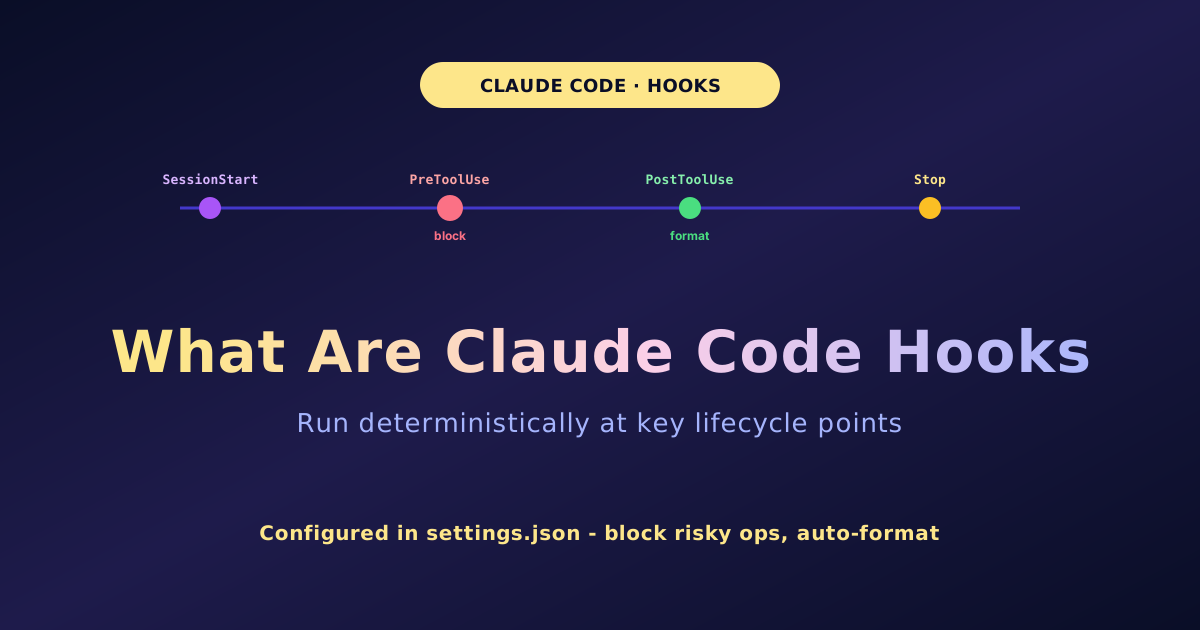
Claude Code hooks are user-defined shell commands that run automatically at specific points in Claude Code's lifecycle, making "this must always happen" real and deterministic without relying on the LLM's judgment. The classic events are nine—SessionStart, UserPromptSubmit, PreToolUse, PostToolUse, Notification, Stop, SubagentStop, SessionEnd, PreCompact—of which PreToolUse and others can block (stopping protected-file edits or dangerous commands). You configure them in settings.json under the "hooks" key as event name -> matcher -> type + command. The I/O contract: a hook receives JSON on stdin (session_id, tool_input, etc.) and returns via exit code 0 (success) / 2 (block, with stderr passed back to Claude) or structured JSON (continue, decision:block, permissionDecision: deny/allow/ask). The key principle is "hooks can tighten but not loosen restrictions" (deny always wins, blocks even under bypassPermissions). Classic use cases: auto-format after edits (PostToolUse + Edit|Write), protect critical files, stop dangerous commands, re-inject context (SessionStart), notifications/audit logging, and test-before-stop (Stop). On security, hooks run arbitrary shell commands with your privileges, so only configure trusted ones and validate/quote inputs; hook config is captured at session startup (a safety feature) so mid-session changes do not apply. Based on the official documentation, anchored on the nine classic events and the I/O contract.

Claude Code "usage limit reached": Causes and Fixes — 5-Hour and Weekly Limits, and the API Escape Hatch

Claude Code "usage limit reached": Causes and Fixes — 5-Hour and Weekly Limits, and the API Escape Hatch

Working in Claude Code, you suddenly see "Claude usage limit reached. Your limit will reset at 3pm" and stop cold. This is not an error or a bug: it is how the Pro/Max subscription usage limits work. This article explains the two-tier structure (a rolling 5-hour window that recovers ~5 hours after your first prompt, plus a weekly window that resets every 7 days, and on Max a separate weekly cap just for Opus), the fact that Claude Code and the Claude apps share the same plan allowance, the four biggest consumption drivers (model choice where Opus burns far more than Sonnet, context size, long continuous sessions, and subagents/MCP), five ways to keep working when you hit the cap (drop to Sonnet with /model, trim context with /compact, wait out a 5-hour window, switch to pay-as-you-go API, or buy credits / upgrade), how to see what is left (/usage, /status, and Settings to Usage for the weekly reset date), and the difference between subscription limits and API limits (429, retry-after, tiers). Because the exact numbers get revised over time, it avoids asserting current figures and recommends checking the live official view.

What Is Spec-Driven Development (SDD)? The Four Steps, Tools, and How It Differs from Vibe Coding

What Is Spec-Driven Development (SDD)? The Four Steps, Tools, and How It Differs from Vibe Coding

In an era where AI writes the code, the higher-value skill is shifting from "writing code" to "writing the spec" — and the practice that captures it is spec-driven development (SDD). SDD puts the spec at the center of the project as the source of truth, and an AI agent derives the design, breakdown, and implementation from it instead of coding right away. The key is that each step leaves a document (often Markdown) that the next step reads. This beginner-friendly guide covers what SDD is (the spec is canonical; code is a derivative), why it matters now (it prevents vibe coding's "three-month wall" of technical debt and requirements drift at the design stage — GitHub reports roughly an order-of-magnitude fewer "regenerate from scratch" cycles), the basic four steps (Specify → Plan → Tasks → Implement), the main tools (GitHub Spec Kit with 90,000+ stars and 30-plus supported agents, AWS Kiro with its Requirements → Design → Tasks flow and Auto router, plus BMAD, OpenSpec, Tessl, Google Antigravity, and Cursor), when to use it versus vibe coding (a hybrid: vibe to explore, spec-driven to ship, with mandatory human review), and how to try it today. In the AI age, the people who rise are those who can define precisely what to build, not those who write code fastest.

The First Step to Earning From Home With AI, From Zero — A No-Face-to-Face Start for Hikikomori and NEETs

The First Step to Earning From Home With AI, From Zero — A No-Face-to-Face Start for Hikikomori and NEETs

Going outside is hard, talking to people is tough, you are not working right now — even so, the chance to turn "from home, without meeting anyone, at your own pace" into income has genuinely widened with AI. This audience-specific guide lays out, as honestly and gently as possible, the first step for someone who is a hikikomori (a withdrawn recluse) or NEET to earn from home, from zero, using AI. It promises up front not to say "anyone can easily make thousands a month" (usually a lie or sales bait) and writes the realistic difficulty, time, and cautions openly. It covers why AI x working from home fits (done with no face-to-face, easy to start from zero, at your own pace — AI lowers the wall as a partner), the three honest truths (you will not earn right away and a first goal is your first few dollars; AI is an amplifier of effort not magic, anything times zero is zero; those who continue, not the smart ones, get results), ways to earn with no talking to people (writing, transcription/subtitles, AI image assets, data tidying, translation checking, digital products — pick one first), the first step today (touch a free AI, pick one field, make one practice piece — make before earning), how to stack small wins (portfolio, one low-pay job, build ratings, raise rate/volume — collect wins not amounts, the first job is worth most), how to keep going and protect your mind (do not compare, break it small, it is OK to rest, drop perfectionism, do not carry it alone — employment support and consultation services), and cautions on scams/hype, the risk of leaving it to AI, and taxes/dependents (avoid pay-first offers, legitimate crowdsourcing is free, check official info). It is not "anyone, easily," but a step you can take truly exists — get back "I can do this too," one at a time.

The Complete Guide to AI Coding Cost Optimization: Cut Your Bill 70–85%

The Complete Guide to AI Coding Cost Optimization: Cut Your Bill 70–85%

"Last month's API bill… $1,800?" In 2026, seriously running Claude Code as an agent has been reported to hit $500–2,000 a month. But just by changing how you use it, you can cut cost 70–85% without lowering output quality (multiple real-world reports converge here). This guide first unpacks the true face of high cost (expensive model, long context, wasted calls; how token billing works; agents consuming about 7x a single session), then the subscription vs. API break-even (API wins roughly only under 50 sessions a month; one estimate puts subscriptions up to 36x cheaper for daily use), a pricing overview (Copilot Pro $10 / Cursor Pro $20, $60–100 when heavy / Claude Pro $20, Max $100; Copilot moved to usage-based AI Credits on June 1, 2026), six levers to cut cost (① model routing for 40–70% off ② prompt caching at about 90% off with a 60–80% hit rate ③ context management ④ choosing subscription vs. API ⑤ auditing duplicate subscriptions ⑥ memory features), a savings checklist you can run today, and pitfalls — false economy, hidden labor cost, duplicate billing, meter shock, over-trusting the cache — plus recommended setups by type. Optimization isn't being stingy; it's designing to pay the right amount for the right thing.

Claude Code Common Errors and Fixes — The Complete Reference

Claude Code Common Errors and Fixes — The Complete Reference

Claude Code suddenly stops with "log in again," "rate limit," "prompt is too long," "MCP won't connect" — and googling each one gets tedious. This is a practical reference that catalogs the errors you commonly hit, with the cause and the command to run for each. It starts with the three diagnostic commands to run first (claude doctor for full diagnostics, /status for active auth, /context for the context breakdown), then focuses on the four common families (usage/rate limits, context overflow, expired auth, MCP connection failures) with symptom→cause→fix-command tables across auth & login, usage/rate limits (Claude Code burns 10-100x the tokens of chat), context & tokens (prompt too long, compaction thrashing), server & model (500/529/timeout/model not found), install/PATH/update, network & proxy (ECONNREFUSED, TLS), MCP, permissions (deny beats bypass), and misc (thinking blocks 400, image/PDF, IDE). It ends with an error→fix cheat sheet and FAQ. Based on the official Claude Code docs (as of 2026): when stuck run the three diagnostic commands, and if it is not fixed, run claude update.

Cursor vs Claude Code vs GitHub Copilot vs Codex — How to Choose the Big Four

Cursor vs Claude Code vs GitHub Copilot vs Codex — How to Choose the Big Four

In 2026 the big four of AI coding tools came into focus — Cursor, Claude Code, GitHub Copilot, and Codex. But lining them up to crown one winner leads you astray, because the four are different types. This article first nails the key point — the type difference (Cursor = AI editor, Copilot = IDE-integrated plugin, Claude Code = local CLI agent, Codex = cloud async agent) — then covers what each tool really is, a same-axis spec table (type, entry and top pricing, models, context, strengths), how to read the 2026 shift from flat fees to "allowance + usage (credits)," picks by your type (ease = Copilot $10+, editor experience = Cursor, heavy multi-file work = Claude Code, async batches = Codex), the capable-developer staple of combining "one IDE-side + one terminal agent," and honest caveats about pricing and benchmarks — all based on official sources and multiple outlets.

AI Design Tools Compared — Canva, Adobe Firefly, Figma AI, and Recraft by Use Case

AI Design Tools Compared — Canva, Adobe Firefly, Figma AI, and Recraft by Use Case

Someone who said "I am bad at design" now produces ten social posts in half a day and gets logo proposals on the side — that is where AI design tools stand in 2026. This article compares the four major tools: Canva (best for mass-producing marketing, social, and slides, free–$15), Adobe Firefly (Photoshop/Illustrator integrated and commercially safe, $9.99+), Figma AI (the standard for UI/UX and product design with teams, $15+/editor), and Recraft (vector logos and icons with 90% text accuracy, $10+). The four are not competitors but a division of roles — narrow to the one that fits your most frequent task. Different from the image-generation AI comparison (Midjourney etc.): this article is about "building deliverables from images," not the image itself. Includes a comparison table, six best-pick scenarios, and three cautions: copyright, brand consistency, and avoiding the "AI look."